LokiSoft
Home
Blog
Services
Products
Showcase
About
Source
View this website's source code on GitHub
LokiSoft

We build open source software guided by Christian values and a commitment to the freedom of knowledge for everyone.

XYouTubeGitHubDiscord

Services

  • Basic Business Portal
  • Web Development
  • App Development
  • Mobile App Development
  • E-Commerce Solutions
  • Custom Software

Products

  • LokiMoney
  • LokiCloud
  • LokiDocs

Company

  • About
  • Blog
  • Contact

Legal

  • Privacy Policy
  • Terms of Service

© 2026 LokiSoft. All rights reserved.

Built with faith, passion, and ♥ for open source

Writing Your First Blog Post: A Quick Start Guide

January 13, 2026
LokiSoft Team
9 min read
DocumentationTutorialGetting Started
Beginner

Your Quick Start Guide to Writing Posts

Welcome! This guide will get you writing blog posts in minutes. No prior Markdown experience required—we'll cover everything you need to know to create professional, engaging content.

"The tongue has the power of life and death, and those who love it will eat its fruit." — Proverbs 18:21 (NIV)

Our words matter. Whether we're writing code tutorials, sharing insights, or telling stories, we have the opportunity to help others. Let's make sure we do it well.


Introduction

Every blog post on this site is a simple text file written in Markdown. Markdown is a lightweight way to format text using plain characters—it's easy to learn and incredibly powerful.

What You'll Learn

  • Creating your first blog post file
  • Writing essential frontmatter
  • Basic text formatting
  • Adding visual elements like info boxes
  • Publishing your content

Prerequisites

RequirementDescription
Text EditorAny editor (VS Code recommended)
Basic KnowledgeAbility to create/edit files
TimeAbout 10 minutes
Markdown is a simple way to format text using plain characters. For example, **bold** is written as `**bold**`. It's easy to learn and widely used across the web.

Creating Your First Post

Every blog post is a .md (Markdown) file in the posts/ directory.

Step 1: Create the File

Create a new file in the posts/ folder. Name it something descriptive with hyphens instead of spaces:

posts/my-awesome-post.md
posts/how-to-build-apis.md
posts/getting-started-with-react.md
The filename becomes your URL! `my-post.md` becomes `/blog/my-post`. Use lowercase letters and hyphens for best results.

Step 2: Add the Frontmatter

Every post starts with frontmatter—metadata between --- markers that tells the system about your post:

---
title: Your Post Title Here
date: 2026-01-15
author: Your Name
excerpt: A brief 1-2 sentence description that appears in post cards and search results.
categories: Category1, Category2
difficulty: 2
---

Frontmatter Fields Explained

FieldRequiredDescription
titleYesThe title displayed on your post
dateYesPublication date (YYYY-MM-DD format)
authorNoAuthor name (defaults to "LokiSoft Team")
excerptNoShort description for cards and SEO
categoriesNoComma-separated list of categories
difficultyNo1-5 rating (1 = beginner, 5 = expert)
featuredNoSet to true to feature on homepage
coverImageNoPath to cover image (e.g., /my-image.jpg)

Step 3: Write Your Content

After the closing ---, start writing your content:

---
title: My First Post
date: 2026-01-15
author: Your Name
excerpt: This is my first blog post!
categories: General
difficulty: 1
---

# Welcome to My Blog!

This is my first paragraph. Writing in Markdown is easy!

## A Section Header

More content here...

"The heart of the discerning acquires knowledge, for the ears of the wise seek it out." — Proverbs 18:15 (NIV)


Essential Markdown Syntax

Here's everything you need for basic formatting:

Text Formatting

What You WriteWhat You GetWhen to Use
**bold text**bold textKey terms, emphasis
*italic text*italic textTitles, foreign words
***bold and italic***bold and italicStrong emphasis
`inline code`inline codeCommands, code
~~strikethrough~~strikethroughCorrections

Headings

# Heading 1 (Main title - one per post)
## Heading 2 (Major sections)
### Heading 3 (Subsections)
#### Heading 4 (Minor sections)
Headings (##, ###, etc.) automatically generate the Table of Contents sidebar, helping readers navigate your post!

Links

[Link Text](https://example.com)
[Internal Link](/about)
[Link with Title](https://example.com "Hover text")

Example: Visit our About Page

Images

![Alt text](/path/to/image.jpg)
![Logo](/lokisoft-logo.svg "Optional title")

Put images in the public/ folder, then reference them with /filename.jpg.

Lists

Unordered (bullet) lists:

- First item
- Second item
  - Nested item
- Third item
  • First item
  • Second item
    • Nested item
  • Third item

Ordered (numbered) lists:

1. First step
2. Second step
3. Third step
  1. First step
  2. Second step
  3. Third step

Code Blocks

For sharing code, use triple backticks with the language name:

```javascript
function hello() {
  console.log("Hello, World!");
}
```

Result:

function hello() {
  console.log("Hello, World!");
}

Supported languages include: javascript, typescript, python, bash, css, html, json, yaml, and many more.


Adding Visual Interest

Info Boxes

Highlight important information with colorful boxes:

<div data-info-box="info" data-title="Your Title">
Your content here...
</div>

Available types:

Use for general information and notes.
Use for tips and best practices.
Use for cautions and important notices.
Use for critical warnings.
Use for positive outcomes and confirmations.

Toggle Boxes (Collapsible Content)

Hide optional content behind a clickable header:

<div data-toggle-box data-title="Click to expand">
Hidden content goes here...
</div>

This content was hidden until you clicked! Toggle boxes are great for:

  • Spoilers or solutions
  • Advanced details
  • Long code examples
  • Optional deep-dives

Blockquotes

Use > for quotes:

> This is a quote. Great for highlighting
> important information.

This is a quote. Great for highlighting important information.

Tables

| Column 1 | Column 2 | Column 3 |
|----------|----------|----------|
| Data 1   | Data 2   | Data 3   |
| More     | Data     | Here     |
Column 1Column 2Column 3
Data 1Data 2Data 3
MoreDataHere

"A word fitly spoken is like apples of gold in a setting of silver." — Proverbs 25:11 (ESV)


Cover Images

Add a cover image that appears on blog cards:

---
title: My Post
coverImage: /my-cover-image.jpg
---

Guidelines:

  • Place images in the public/ folder
  • Use landscape orientation (16:9 works great)
  • Recommended size: 1200 x 630 pixels
  • Supported formats: .jpg, .png, .svg, .webp

Complete Example Post

Here's a full example you can copy and modify:

---
title: Getting Started with TypeScript
date: 2026-01-15
author: Your Name
excerpt: Learn the basics of TypeScript and why it's becoming the standard for modern JavaScript development.
categories: Programming, TypeScript, Tutorial
difficulty: 2
coverImage: /typescript-cover.jpg
---

# Getting Started with TypeScript

TypeScript adds static typing to JavaScript, catching errors before they reach production.

> *"The wise store up knowledge, but the mouth of a fool invites ruin."*
> — Proverbs 10:14 (NIV)

<div data-info-box="info" data-title="Prerequisites">
You should be familiar with basic JavaScript before starting this tutorial.
</div>

## Why TypeScript?

Here are the main benefits:

- **Type Safety** - Catch errors at compile time
- **Better IDE Support** - Autocomplete and refactoring
- **Self-Documenting** - Types serve as documentation

## Your First TypeScript Code

Create a file called `hello.ts`:

\`\`\`typescript
function greet(name: string): string {
  return `Hello, ${name}!`;
}

console.log(greet("World"));
\`\`\`

## Conclusion

TypeScript makes JavaScript development safer and more productive.

---

## A Prayer for Learners

*Lord, thank You for the opportunity to learn and grow...*

*In Jesus' name, Amen.*

Quick Reference Card

ElementSyntax
Bold**text**
Italic*text*
Link[text](url)
Image![alt](url)
Code`code`
Heading## Heading
List- item
Quote> quote
Divider---

What's Next

Now that you know the basics:

  1. Create your first post - Practice makes perfect
  2. Explore all features - See everything available
  3. Read the template - Learn professional structure
  4. Experiment - Try different components

Conclusion

You now have everything you need to start writing great blog posts. Remember:

  1. Start simple - Basic Markdown is enough for most posts
  2. Add visuals gradually - Info boxes and code blocks as needed
  3. Focus on content - Features serve your message, not the other way around

The best way to learn is by doing. Create your first post right now—it doesn't have to be perfect!

"Whatever your hand finds to do, do it with all your might." — Ecclesiastes 9:10 (NIV)


A Prayer for Writers

Lord, thank You for the gift of words and the ability to share knowledge with others.

Help us write with clarity, humility, and purpose. May our content serve readers well—answering their questions, solving their problems, and encouraging their growth.

Give us wisdom to know what to share and how to share it. Keep us honest, helpful, and always learning. Use our words to make a positive difference in someone's day.

In Jesus' name, Amen.


Getting Started Checklist

  • Create a new .md file in posts/
  • Add frontmatter with title, date, and excerpt
  • Write your introduction
  • Add main content with proper headings
  • Include at least one Scripture reference
  • Add a closing prayer
  • Proofread for errors
  • Preview locally before publishing
The best way to learn is by doing. Create your first post right now—it doesn't have to be perfect!

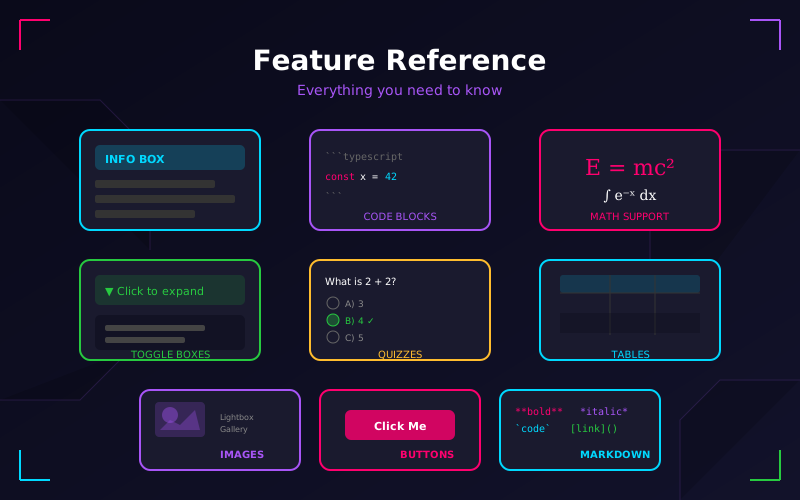
For a complete reference of all available features, check out the Post Features Guide.

Spotted a bug in the matrix?

Found an error, typo, or want to improve this post? We welcome contributions! Submit a pull request or open an issue on GitHub. Or drop a comment below to start a discussion. Thanks for helping us keep the signal clean!

Comments

Share this post: